A CRM with enough in it to use, and no more
Nermio keeps track of who your customers are, what you discussed, which deals are open and what you need to do today. That's it. No modules to configure before any of it is worth anything.
You know it, but it's written down nowhere
In most small businesses, what you know about a customer sits in three places: a spreadsheet nobody maintains, the inbox of whoever had the conversation, and that person's head. With one person, that works. With two, one of you rings a customer the other spoke to last week.
The usual answer is a large CRM. It can do everything, costs €30 to €90 per person per month, and needs a fortnight of setting up first. Three months later nobody is keeping it up to date, because every customer record asks for seventeen fields you don't know.
Nermio starts from the other end. Not: what can a CRM do. But: what do you actually do every day, and what is the least it takes to do that.
Five parts, and they hang together
Not separate apps under one name: a deal belongs to a company, a task belongs to a deal, and everything you do lands on the same timeline.
Companies and contacts
One file per company, with the people you speak to and a timeline of everything that has happened.
Read moreSales pipeline
Six stages from lead to won. Drag a card to the next stage; lost asks you for a reason.
Read moreTasks and follow-ups
Tasks with a due date, grouped by day, plus the deals that have been quiet for a fortnight.
Read moreTeam and permissions
Invite colleagues and decide what each of them can do. Four roles, from full access to read-only.
Read moreYour data, in and out
Bring your existing list as CSV, and take your companies, contacts, deals and tasks back out the same way.
Read more
Three screens, and you've got it
The whole day goes through these three. The rest of the program is settings you look at once.
Today
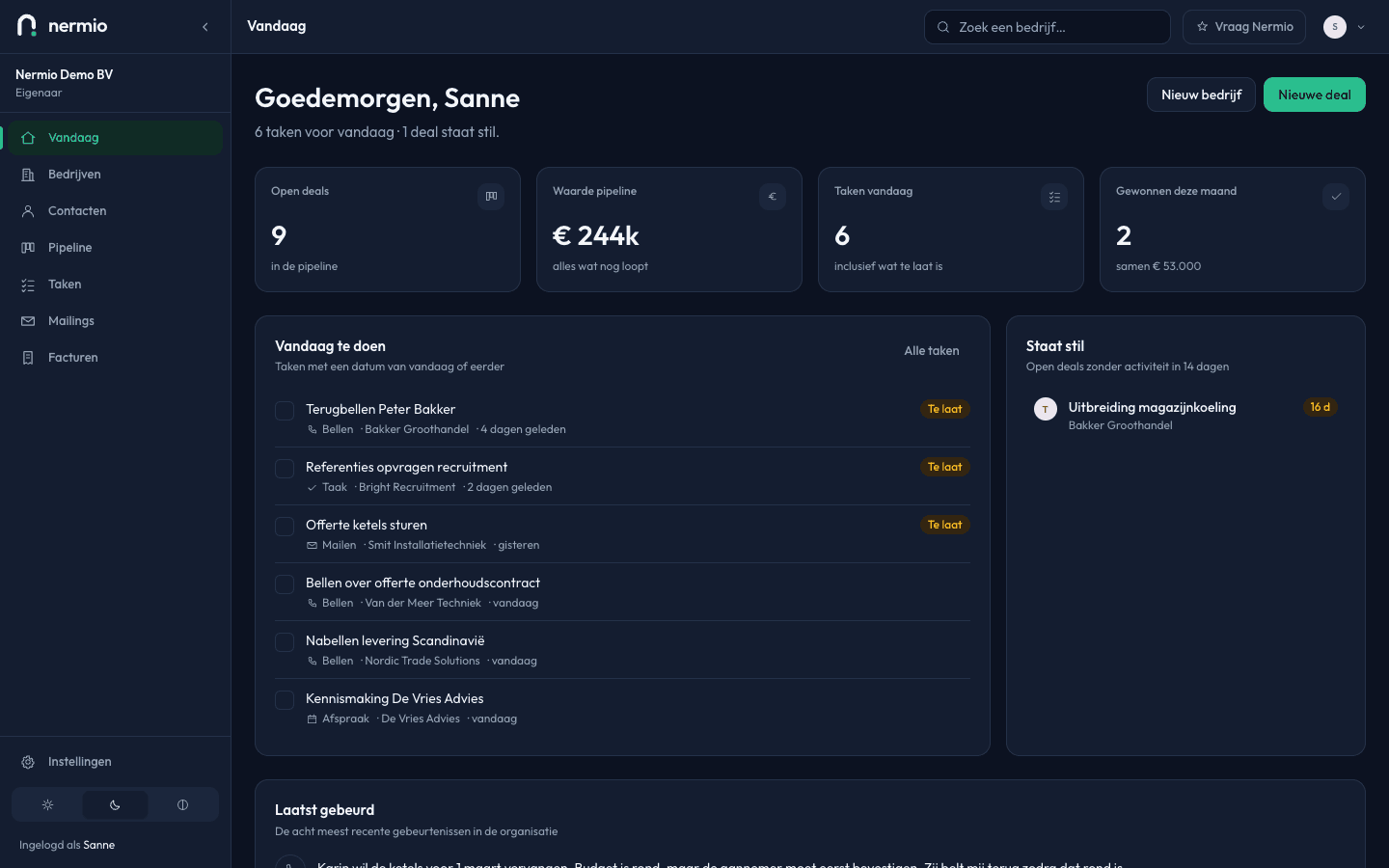
You open the day and see four numbers: open deals, the value still running, your tasks for today, and what you won this month. Below that are the tasks themselves and the deals where nothing has happened for a fortnight.
nermio.comThe Today screen: four numbers at the top, below them today's tasks and the deals that have gone quiet. Pipeline
Every deal is a card in the column for its stage, with the count and the value above each column. You drag a card to the next stage; if dragging doesn't suit you, you pick the stage in the deal's own panel.
nermio.com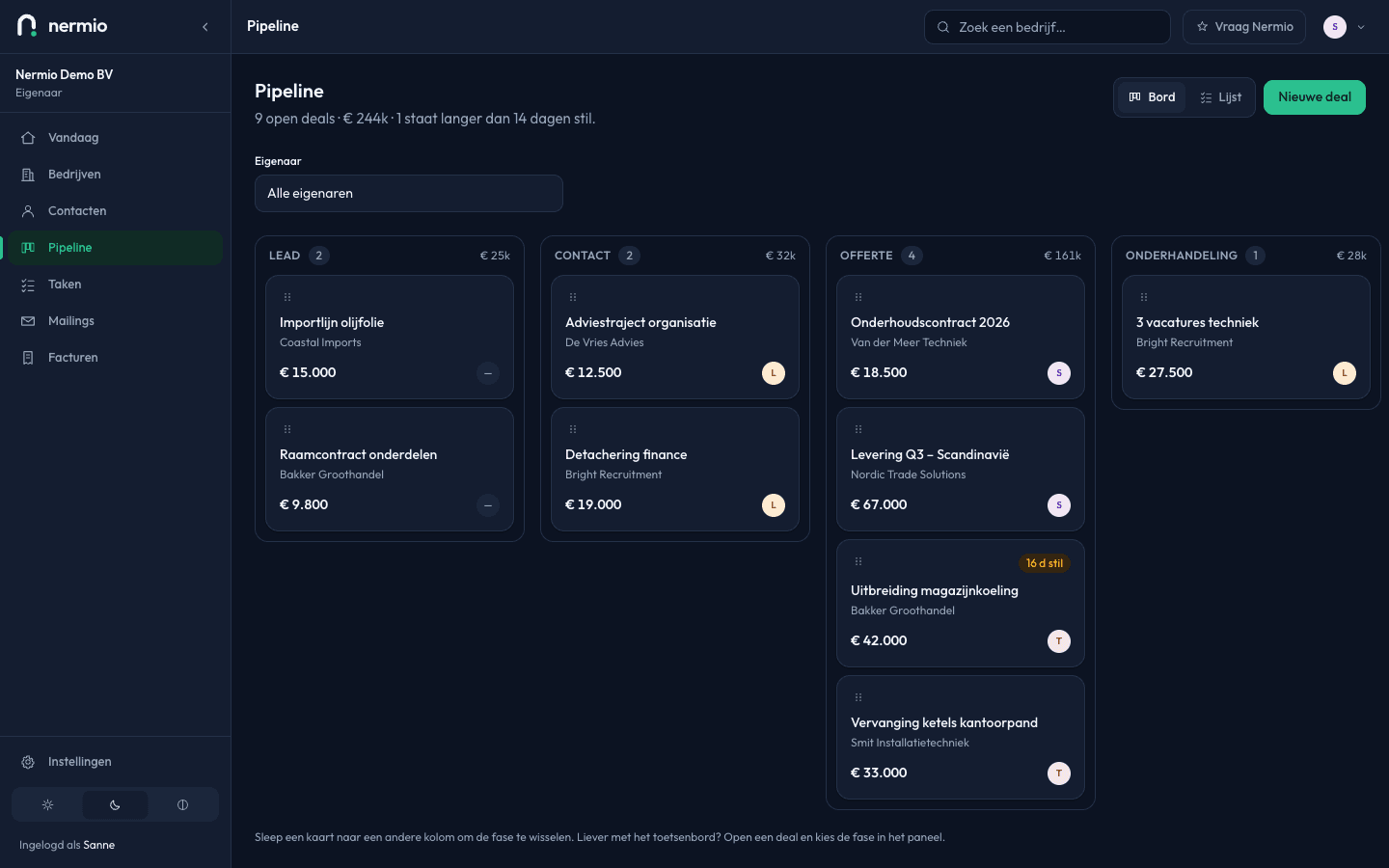
The pipeline as a board: a column per stage with the number of deals and their value above it, and a card per deal. Company file
Per company, the deals, the contacts and the open tasks sit together, with the details and the timeline alongside. A note after a call is one field and three lines.
nermio.com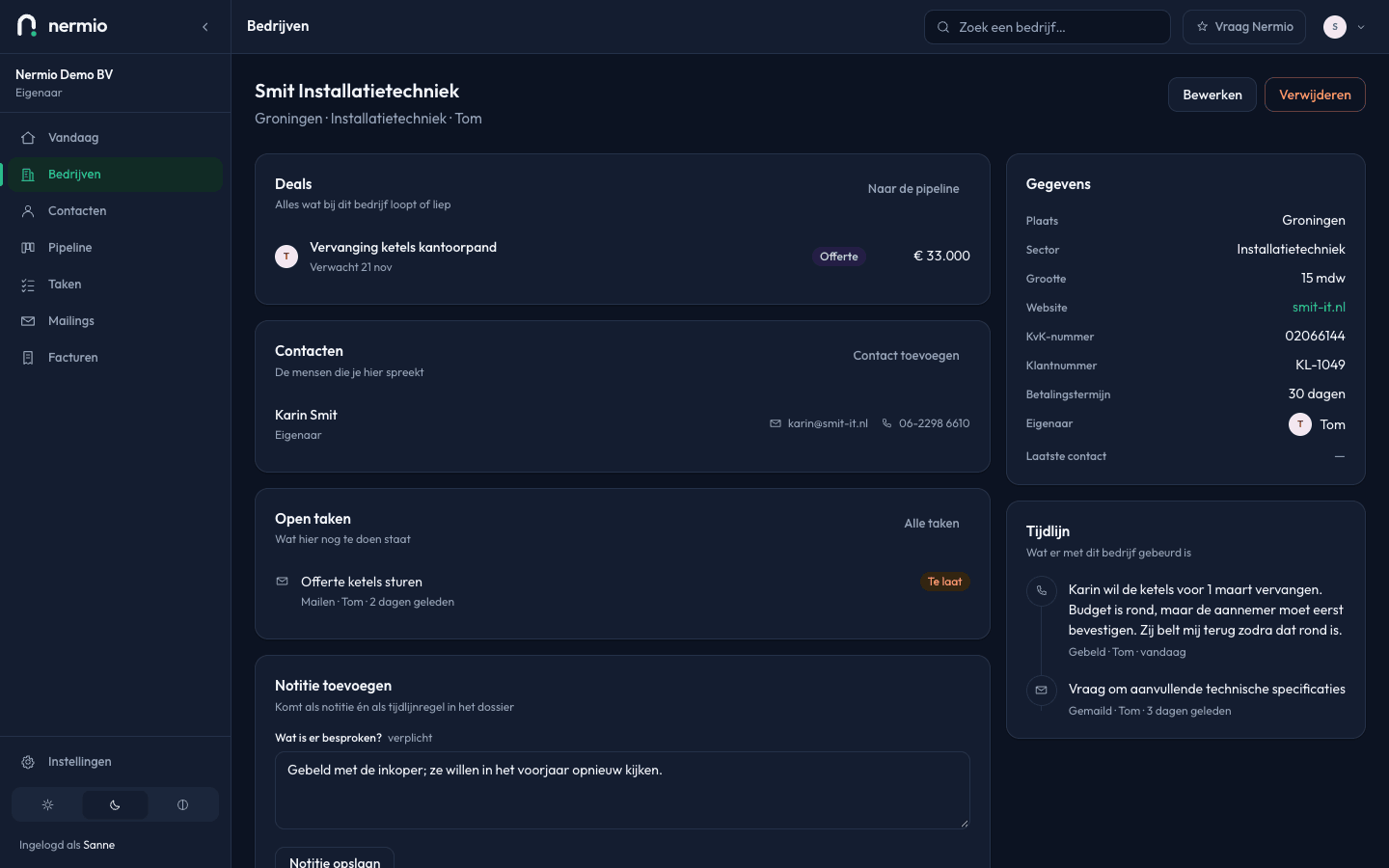
A company file: deals, contacts and open tasks on the left, the details and the timeline on the right.
In use this afternoon
No implementation project, no consultant, no weeks of configuration.
Put one company in
Or bring your existing list. One company is enough to start; leave the fields you don't know empty.
Write down what you agreed
After a call you write three lines and add a task. Both land on that company's timeline.
Open your day in the morning
You see what's due and which deals have gone quiet. There's nothing else to remember.
Businesses with nobody whose job is the CRM
Big enough that you can't keep it in your head, small enough that there's no department looking after a CRM.
Sole traders and small teams
You do the selling yourself, alongside everything else. Nermio is the place you don't have to come back to, because it reminds you.
Professional services
Long engagements with a lot of conversations in between. The timeline per company does half the work there.
Trades, installation and engineering
Plenty of enquiries, plenty of quotes, and follow-ups that otherwise disappear between working days.
What you won't find in it
The easiest answer to every question is yes, and that is exactly why CRMs become unusable. These aren't in it, and that's a choice.
Nermio doesn't send newsletters and doesn't measure open rates. There's no phone system in it, no WhatsApp integration and no calendar sync. There's no mobile app: the site works on a phone, but it is a website. Invoicing does work — writing, emailing as a PDF and crediting — but your bookkeeping stays in whatever you use for that.
What we do promise is that the list above is honest. There is no feature described on this site that you won't find after logging in.
€20 a month for your whole company
Not per user. Adding colleagues costs nothing, so you don't have to decide who gets to be in it.
One rate, no tiers and no packages. You cancel whenever you want; there's no year-long notice period.
See what's includedWhat you pay
- Yearly, up front
- €20 a month
- Monthly
- €24 a month
- Per extra colleague
- €0
- Notice period
- None
Try it with your own customers
You don't need a credit card and you're not tied to anything. Ten minutes tells you whether it fits.